Steam Manifest Hub: What It Is, How It Works, and Safer Alternatives
A practical guide for users searching for Steam Manifest Hub, ManifestHub links, and SteamTools manifest packages without getting lost in unsafe mirrors or outdated files.

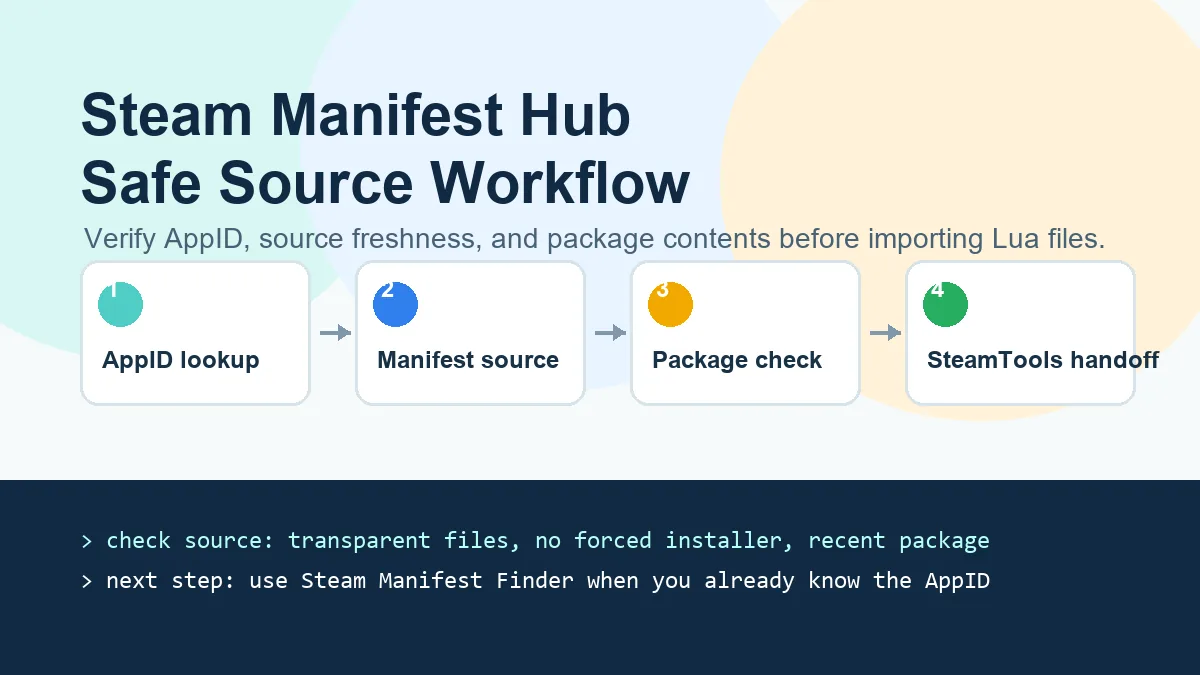
A safe Steam Manifest Hub workflow starts with the AppID, checks the source, then verifies the manifest package before using it.
Table of Contents
If you searched for "Steam Manifest Hub", you are probably trying to find a reliable place to get Steam manifest files, Lua scripts, or a SteamTools-ready package for a specific game. The phrase is used loosely across search results, GitHub pages, Discord conversations, and mirror sites.
The important point is this: a manifest hub is not useful just because it has files. It is useful only when you can connect the right AppID to the right depot manifests, understand what changed, and avoid stale or repackaged downloads.
This guide explains what the term usually means, how ManifestHub-style repositories are organized, what safety checks matter, and when it is faster to use a Steam manifest finder instead of browsing folders manually.
What Does Steam Manifest Hub Mean?
Steam Manifest Hub usually refers to a public or community-maintained collection of Steam manifest-related files. Users search for it when they want manifest files, Lua scripts, JSON metadata, VDF key files, or a ready-made package that can be used in a SteamTools workflow.
It is not an official Steam feature. Steam itself uses manifests internally to describe depot contents, file hashes, versions, chunks, and update data. Community hubs collect references or packages around those files so users do not have to locate everything by hand.
Because the term is broad, search results can mix real repositories, mirrors, outdated pages, and unrelated download sites. That is why the source check is more important than the name on the page.
Searchers also use variants such as "manifest hub Steam" or punctuation-heavy versions of the same phrase. These variants usually express the same intent: identify a trustworthy manifest source, confirm the AppID, and understand whether the result is a raw repository, a lookup page, or a complete SteamTools package.
AppID First
Every lookup starts with the Steam AppID. If the AppID is wrong, even a valid manifest source will return the wrong result or no package at all.
Depot and Manifest IDs
A single game can have multiple depots, language packs, DLC entries, and manifest versions. A good source makes those relationships clear.
Lua Scripts
SteamTools workflows often need Lua files alongside manifests. A hub that only lists manifest IDs may still require extra manual setup.
Source Trust
The safest path is a transparent source with predictable file names, recent updates, and no forced installer or executable wrapper.
How ManifestHub-Style Sources Work
Most manifest sources are organized around AppIDs. Inside an AppID folder, you may find depot manifest files, Lua scripts, configuration JSON, and sometimes VDF key files. The exact structure depends on the repository or tool.
A manual workflow means finding the correct game AppID, opening the corresponding folder, checking whether the latest game build is covered, downloading the files, and then importing the right Lua script into SteamTools. This works, but it is easy to grab stale files when a game updates often.
A finder workflow automates the boring parts. You enter the AppID, the tool checks the supported manifest source, and it points you to the package or tells you that nothing is currently available.
| Element | What It Does | Why It Matters |
|---|---|---|
| AppID | Identifies the Steam game or app | Controls which folder or package you should inspect |
| DepotID | Splits the game into file groups | Explains why one AppID can need several manifests |
| ManifestID | Identifies a depot file version | Helps match the package to a game build |
| Lua file | Tells SteamTools how to handle the app | Usually needed for a complete SteamTools handoff |
| VDF or key data | Stores supporting configuration | Missing keys can cause failed imports or unusable packages |
Safe vs Risky Steam Manifest Downloads
A safe manifest download should be plain, inspectable, and consistent with the source it claims to use. Be cautious with pages that force an executable installer, hide the file list, add password-protected archives, or ask you to disable browser or antivirus warnings.
Manifest and Lua files are small text or data files. They do not need a custom downloader, browser extension, or bundled launcher. If a page adds those requirements, treat it as a separate software trust decision rather than a normal manifest lookup.
Also watch for old packages. A manifest can be technically valid but still wrong for the current game build. If the game was updated recently, a stale package may import but fail later.
Practical safety rule
Prefer transparent file sources and browser-based lookup tools. Avoid any "Steam Manifest Hub" result that turns a small manifest package into an executable download.
Best Workflow for SteamTools Users
The fastest reliable workflow is simple: confirm the AppID, check availability, inspect the package contents, then import the Lua file only if the package matches the game you intended.
You do not need to memorize depot structures for every game. You do need to avoid guessing AppIDs from game names, because many games have demos, regional editions, DLC-only AppIDs, soundtrack AppIDs, and test branches.

-
Find the correct AppID
Use the Steam store URL, SteamDB, or the AppID Finder on this site. Confirm that the number belongs to the exact edition you want.
-
Check manifest availability
Use the Steam Manifest Finder to see whether a supported package exists before browsing a repository manually.
-
Review the package
Look for the expected manifest, Lua, JSON, and key files. If the package contains unrelated executables, treat it as unsafe.
-
Import carefully
Use the Lua file only after checking that the AppID and file names match your game. If SteamTools does not recognize it, recheck the AppID first.
Better Lookup Options Than Random Mirrors
Random mirrors often rank because they reuse popular words such as Steam manifest, ManifestHub, and Lua generator. Ranking does not prove that the files are current or safe.
A better option is to use a focused lookup page that makes the handoff clear. On this site, the Steam Manifest Finder checks package availability by AppID, while the main Manifest & Lua Generator focuses on preparing a complete package when a supported result exists.
For background learning, the AHD Manifest Finder guide explains the wider terminology around manifest finders, AppIDs, depots, manifests, and SteamTools. Use that when you need concepts; use the finder when you already have an AppID.
| Need | Best page on this site | Reason |
|---|---|---|
| I know the AppID and need a package | Steam Manifest Finder | Fast availability check with fewer manual steps |
| I need the complete manifest and Lua workflow | Manifest & Lua Generator | Designed around packaged downloads |
| I do not know what AHD or manifest finder means | AHD Manifest Finder Guide | Explains the terminology and process |
| I only know the game name | AppID Finder | Helps avoid choosing the wrong Steam AppID |
FAQ
About the author
Sophie Laurent
Tech Writer & PC Gaming Enthusiast
Sophie Laurent writes practical guides about Steam file management, AppIDs, manifests, and SteamTools workflows. Her goal is to turn confusing repository terms into clear steps that everyday PC gamers can follow safely.
References and further reading
- SteamDB technical blog — Taking a look at Steam's download and preload system (steamdb.info/blog/steam-download-system/)
- Steamworks Documentation — Applications and depots (partner.steamgames.com/doc/store/application/depots)
- PCGamingWiki — Steam technical reference (pcgamingwiki.com/wiki/Steam)
Last updated: July 10, 2026